
Free Resume ATS Score checker
If you are wondering why does your resume keep getting rejected and aren’t landing interviews, try running your resume through the TurboApply AI ats score checker. It shows you your actual resume ats score so you can see exactly what the software is filtering out. Clear formatting errors and secure recruiter callbacks instantly.

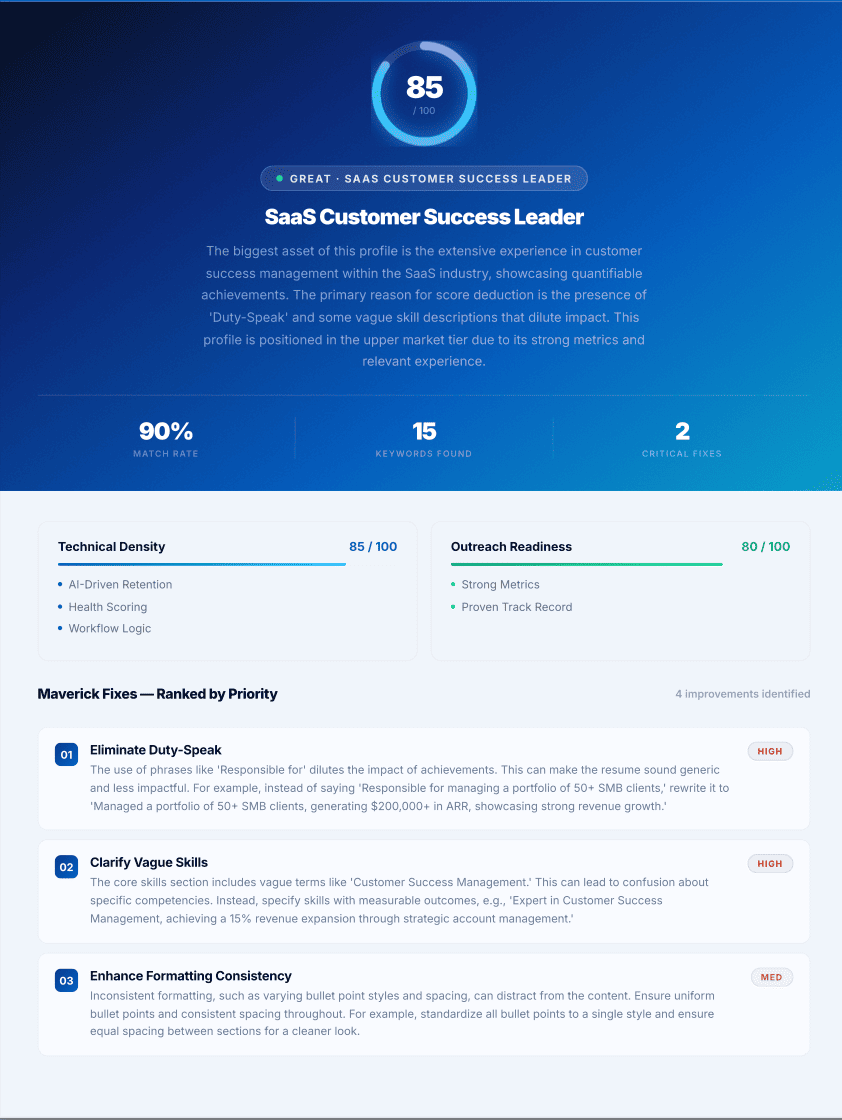
ATS match score classification
Enterprise recruiting engines grade documents algorithmically before alerting human recruiters.
AI Summary
An ATS score is a number out of 100. It estimates how accurately a resume matches a target job description. Using the free TurboApply ATS Checker helps candidates fix garbled text extraction and achieve an 85 percent match score. A good ATS score is 80 or higher. This secures human recruiter visibility.
Is your resume ready for ATS screening?
An applicant tracking system (ATS) is software employers use to scan, store, and rank resumes. When you apply for a job, your file is screened by software before it reaches a recruiter. Companies use this software to manage high application volumes and filter out unqualified candidates immediately.
If your resume fails to pass the ATS filter, you are auto-rejected. You never hear back. The success of your application depends entirely on how well you tailor your document for the exact job you want. You must use the right template, include the correct hard skills, and remove formatting errors.
Our free ATS Resume Checker scans your file against enterprise standards. We evaluate over 30 specific criteria across your content, format, and structure to show you exactly why your applications are failing.
What is an ATS score?
An ATS score is a number out of 100. It estimates how well your resume will pass an Applicant Tracking System. Our tool scans your document the exact way software like Workday or Lever does. It returns your score instantly, along with the specific issues holding it back.
The 4 core factors of a high score
- Keyword match: How closely your hard skills and job titles match the exact job description you are targeting.
- Clean formatting: Whether the ATS software can parse your text clearly without scrambling your information.
- Clear structure: Using standard sections for contact details, experience, skills, and education so the machine knows where to look.
- Readability: Removing images, tables, or unusual fonts that break the extraction process.
Fix those 4 things and your score climbs.
The 2-tier ATS scoring system
Most free checkers only test if a machine can read your file. We built our Resume Checker to analyze the two different barriers you have to pass to get hired.
Tier 1: The machine parse rate
The tool attempts to comprehend your resume structure. We reverse-engineered the parsing logic of popular systems like Greenhouse, Lever, and SAP SuccessFactors. We look for signs of software compatibility.
If our checker can extract your skills and experience cleanly, the company ATS will too. If it extracts a jumbled mess, you fail. For example, if you use a 2-column layout, the system reads straight across the page. It mixes your job title with your contact details, rendering the file unreadable.
Tier 2: The human recruiter check
Applicant tracking software does not care about bad writing or weak impact. But human recruitment managers do. The second part of our score checks the actual quality of your written content.
We flag ambiguous claims, missing context, and weak action verbs. We check to make sure your bullet points show measurable results. A resume that passes the machine filter but fails to impress the human will still result in a rejection.
What our checker analyzes (over 30 specific checks)
Our system runs your resume through over 30 individual checks designed by hiring managers. The checks fall into 4 core groups.
1. ATS essentials and formatting
We check your file format and file size. We verify that your dates and links remain consistent. We look for page density, section order, and professional email addresses. Our tool flags formatting and layout issues that block ATS scans entirely.
2. Semantic keyword matching
We perform a hard skill gap analysis. We cross-reference job description requirements against standard industry terminology to find exactly what you are missing. We ensure you do not use cheap keyword stuffing, which recruiters actively penalize.
3. Impact and measurable achievements
Recruiters look for evidence of impact. We check whether your bullet points show measurable results or just list basic duties. We flag weak opener verbs like ‘Assisted’ or ‘Helped’ because they hide what you actually achieved. We look for numbers, percentages, and financial impact data.
4. Recruiter red flags and bias
We identify chronological gaps on your resume. We look for interview risk signals, age bias based on graduation dates, and unclear employment history. We ensure your LinkedIn profile URL works and matches your stated experience.
How to improve your resume score
Most gains come from a few repeatable fixes. Review your report, fix what it flags, and score the resume again.
- Rewrite your experience section to include quantifiable achievements. Add digits to unquantified bullet points.
- Swap weak verb openers for strong action verbs. Cut all filler words.
- Include skills that are relevant to the position you want. Compare your document to the exact job description.
- Use a clean, single-column PDF resume. Do not use double columns, text boxes, or Canva graphics.
- Fix spelling mistakes and stick to conventional headings like “Work Experience” and “Education”.
CV checker vs resume checker
A CV and a resume act as the exact same document for tracking software. The US and Canadian markets call it a resume. Europe and Australia call it a CV. The ATS scoring, keyword analysis, and improvement rules apply to both formats equally.
Common ATS myths to avoid
There is a lot of bad advice regarding resume optimization. Here are two massive mistakes to avoid.
Myth 1: You should hide white text on your resume. Never do this. Modern ATS platforms extract raw unstyled text. When a recruiter opens your file in plain text preview mode, the white text appears as an unformatted block of keywords at the bottom of the page. You will be disqualified for spamming.
Myth 2: ATS software cannot read PDFs. This is false. Standard text-based PDFs work perfectly for modern systems. In fact, they are preferred because they lock your formatting in place. Avoid saving PDFs as flat image files or scans, which are unreadable to all systems.
Frequently asked questions
About Tovin Varghese
Tovin Varghese is the Founder and Director of TurboApply AI. He builds autonomous systems for decision intelligence and outcome-driven recruiting operations. He researches labor market velocity and develops free resources, ATS scoring tools, and direct outreach strategies to help job seekers secure interviews faster.